Use the Different Ways to Select in SOLIDWORKS
All SOLIDWORKS users are able to select items in SOLIDWORKS by clicking on them. Also, you can make multiple selections using the control key. But did you know that there is a menu that allows you to use different ways of selection? Selecting a volume, selecting by size, selecting Toolbox are just the beginning of the types of selections possible.
Where to find the Selection menu and Default selection
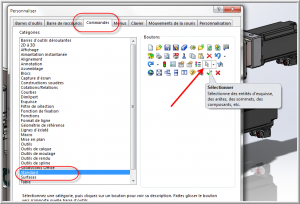
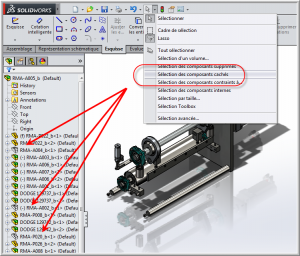
The full Select menu is available in the icons above the Command Manager. The icon is a small arrow with a drop-down menu on the side. If this icon is not visible, just add it by personalizing your menu.
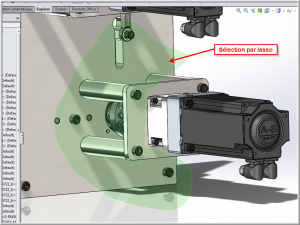
Also, by default, the selection in the graphics mode is made by a rectangle. When you click and drag the mouse, a rectangular selection window appears and selects what is inside. On the other hand, this is sometimes restrictive and that is why it is possible to make a selection in lasso. This mode allows you to make a selection window as desired. This makes it easier to select parts, because we are not limited by the rectangle.
Selection of components hidden, deleted, etc.
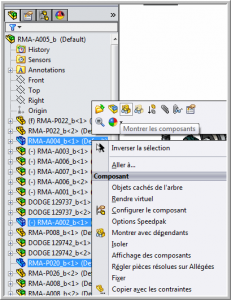
It is very common to hide parts when working in an assembly. When these are found in sub-assemblies, it is difficult to find them all at once. Therefore it is possible to use the selection of hidden components, deleted components, etc. In one click they are found and displayed again.
Select by size or Toolbox
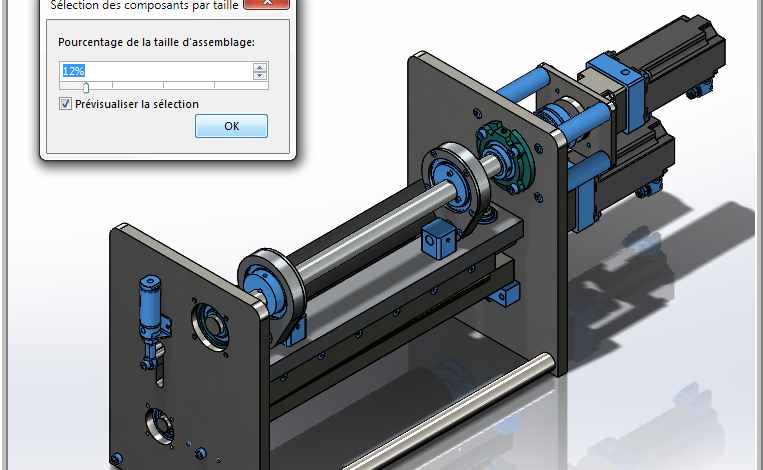
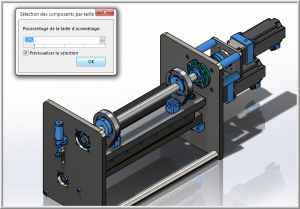
A particularly interesting selection is the selection by size. If an assembly is too heavy and you want to remove all the small parts to begin with, you can select by size.
There is also a Toolbox selection which allows you to select all the files that were created with the Toolbox add-in at once. So all nuts, screws, bolts and the like will be selected quickly.
Creation of your own selection criteria
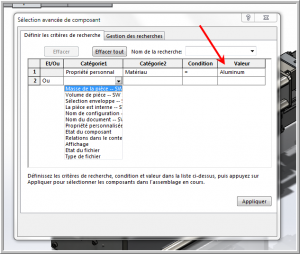
Finally, you can produce your own selection criteria yourself. Using the mass of the part, your properties, density, material, etc.
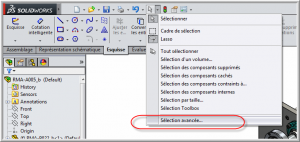
In the following example, we have produced a selection criterion which makes it possible to obtain all the parts which have the value aluminum as “material” property.
To conclude, if you want to know more about the selection options in the assemblies you can watch our technical brief on the subject.